



PerObjectRT 시스템 소개
PerObjectRT 시스템은 3D 월드 렌더러 객체를 별도 RenderTexture에 Atlas 형식으로 렌더링하고 해당 RenderTexture를 UGUI에서 참조해서 렌더링하는 시스템입니다.
주요 목적은 Spine 오브젝트 다수를 UGUI에 한번에 렌더링하기 위해 개발했으며, 그 외에도 파티클 시스템이나, 일반 Mesh Renderer & Skinned Mesh Renderer까지 동일하게 사용 가능합니다.
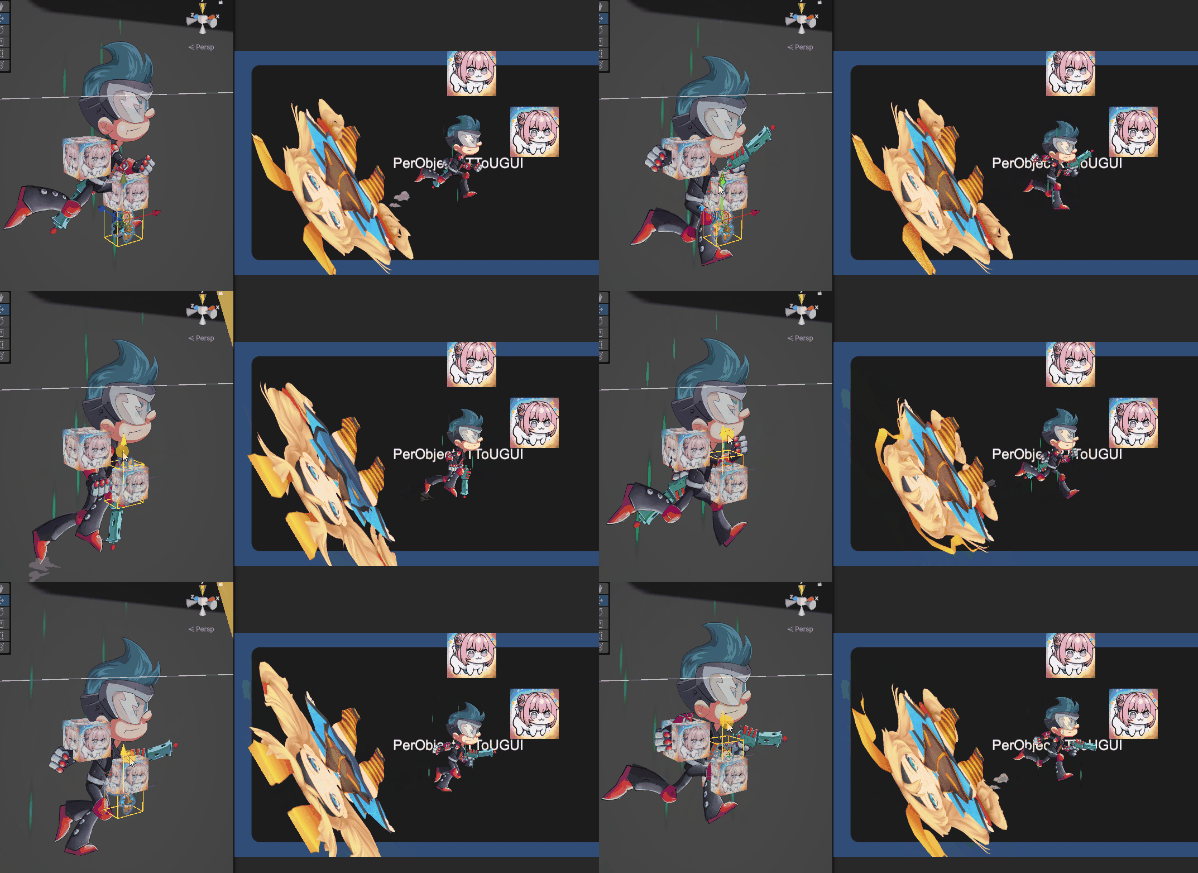
Spine에서 제공하는 Skeleton Render Texture와 목적은 비슷하지만, PerObjectRT 시스템은 3D 월드에서 Spine에 파티클 시스템 및 기타 Renderer 오브젝트를 합친 결과물을 드로우콜로 한번으로 UGUI에 출력할 수 있는 차이점이 있습니다.
또한 URP 렌더파이프라인이 아닌, 직접 CommandBuffer에 렌더링하는 시스템으로 개발되어, 카메라 없이 단독으로 렌더링 가능합니다. 따라서 불필요한 Culling & Sorting 등 비용이 발생하지 않고 오직 원하는 오브젝트를 RenderTexture에 렌더링하는 비용만 발생합니다.
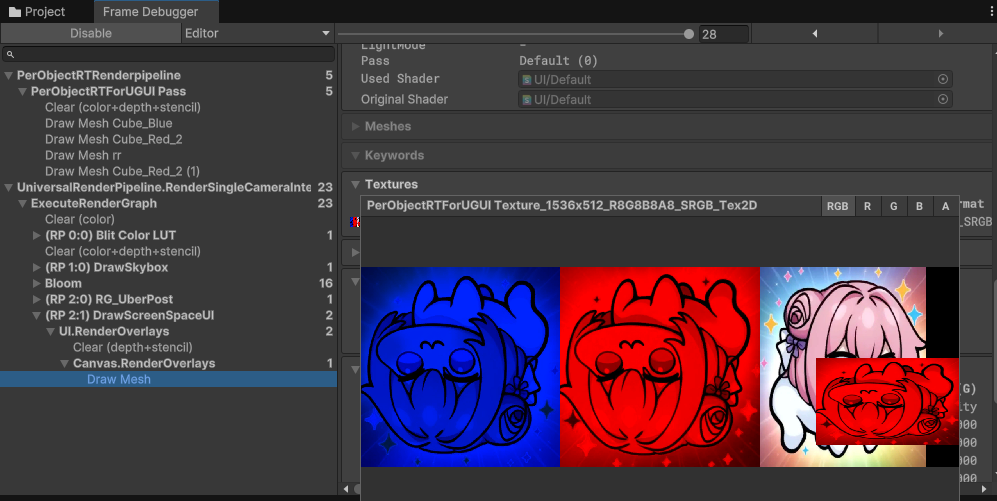
커스텀 랜더파이프라인
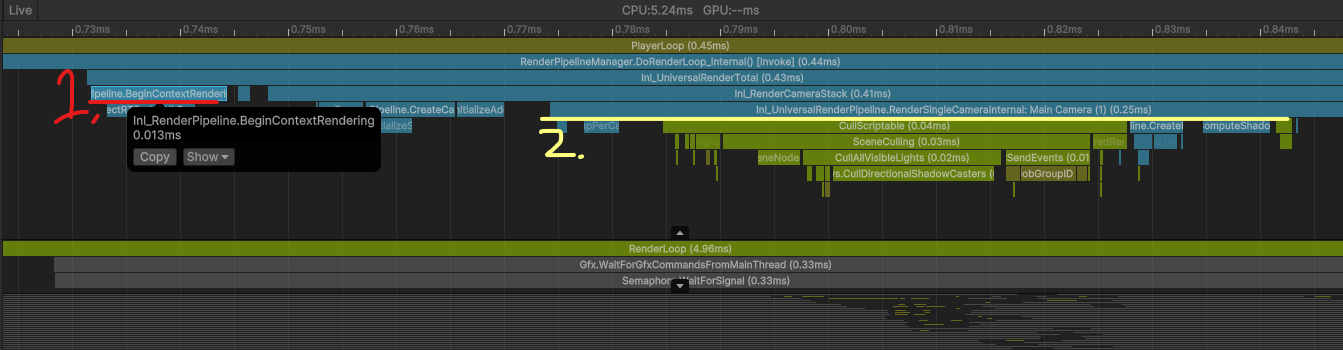
URP 렌더파이프라인은 모두 카메라에서 수집한 정보를 기반으로 동작합니다, 그래서 카메라에서 수행하는 Culling & Sorting 등 비용이 발생하게 되는데, 제작하는 시스템에서는 원하는 오브젝트만 RenderTexture에 렌더링하는 것이기 때문에 이러한 작업은 불필요한 비용 발생입니다.
그래서 URP 렌더파이프라인을 이용하지 않고 직접 커맨드버퍼에 ViewProjection 정보를 세팅하고 메쉬를 드로우하는 시스템 개발을 했습니다.
URP 렌더파이프라인을 이용하는 경우, UniversalCameraData로부터 Culling & Sorting 등 처리가 완료된 카메라 프러스텀에 보이는 RendererList가 들어오게 되며, 해당 데이터를 기반으로 렌더링 호출하도록 동작합니다.
이 RendererList나, CullingResult 데이터는 URP 패키지 Internel로 되어 있거나 Unity 블랙박스 코드로 되어 있어 접근 및 수정이 불가능합니다.
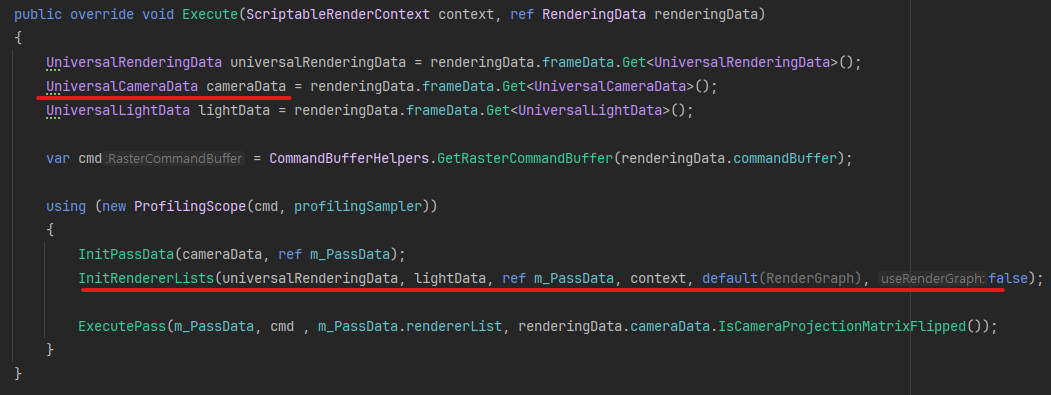

직접 커맨드 버퍼로 렌더링 호출하고 싶은 경우, 우선 RenderPipelineManager 렌더링 콜백 함수를 통해 렌더링 호출 이벤트를 받을 수 있으며, 해당 함수 내부에 커맨드 버퍼 명령을 구현합니다.
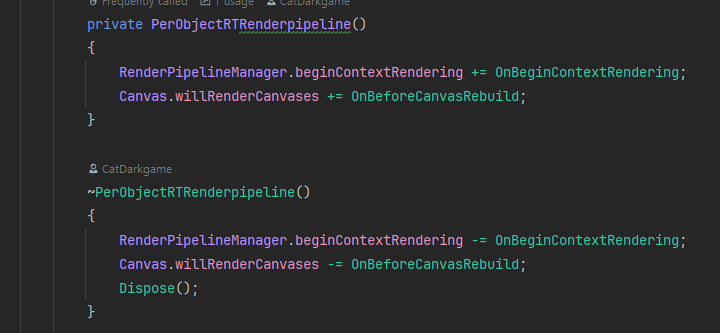
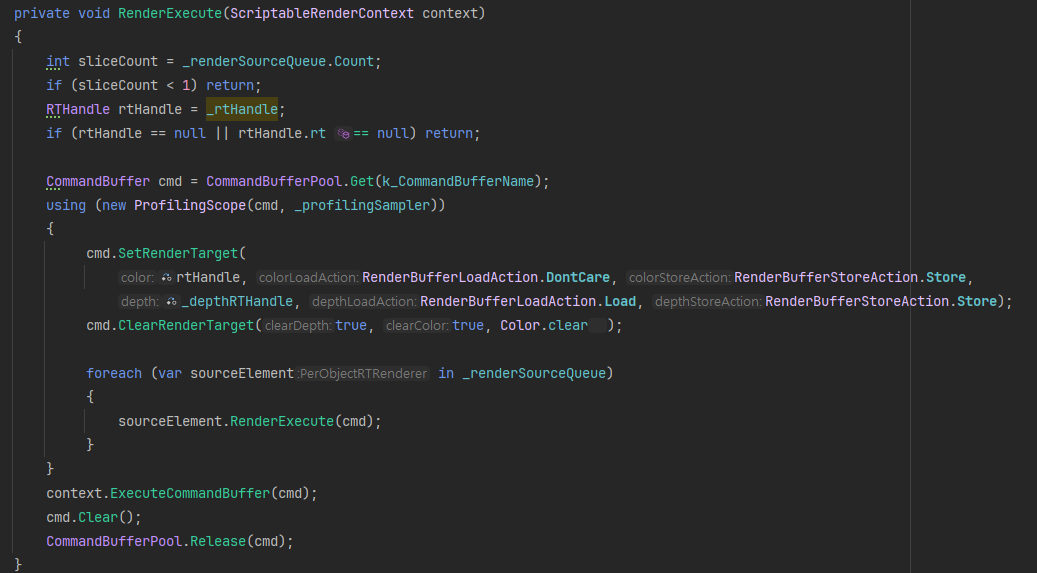
PerObjectRT 시스템은 사전에 수집한 Renderer 정보를 직접 생성한 RenderTexture에 렌더링하도록 구현했습니다.
이때 카메라가 없기 때문에 View & Projection Matrix를 각 오브젝트가 순차적으로 캡처되도록 해야합니다.
행렬 정보 계산은 다음 파트에서 설명합니다.
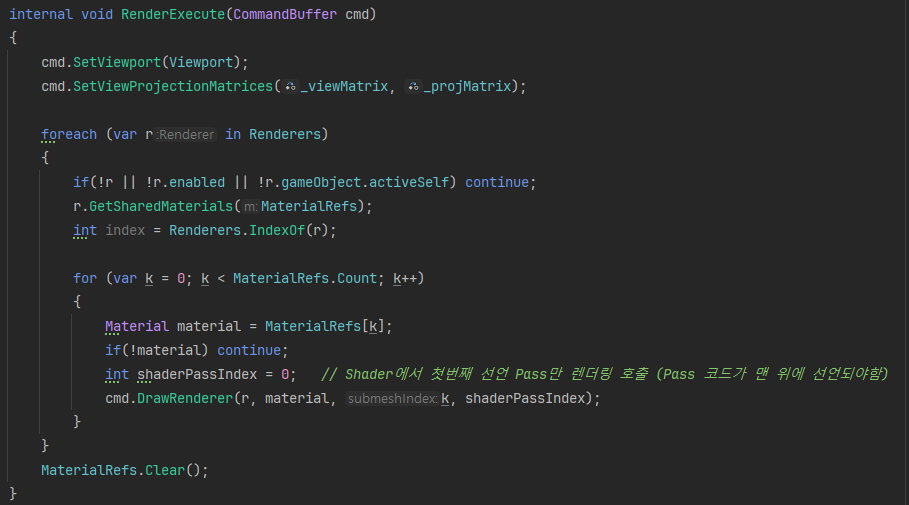
PerObject Renderer 객체 정보 수집, Bounds & VP Matrix 계산
Monobehaviour 객체로 Renderer 및 Bounds, Transform을 수집합니다. 해당 Monobehaviour 컴포넌트가 붙은 오브젝트는 PerObjectRT 렌더 시스템에 렌더링하게 됩니다.
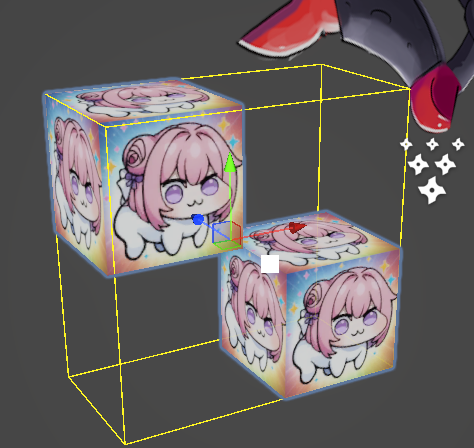
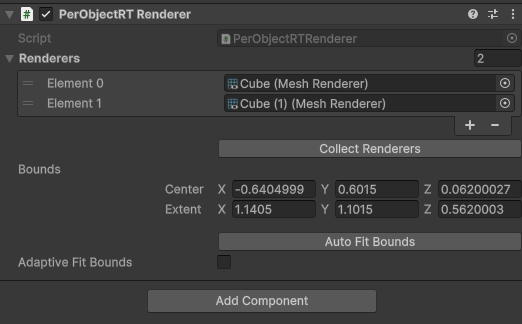
수집한 Bounds 및 Transform 정보는 단일 매니저 클래스에 Register(등록)해서 단일 List로 관리됩니다.
등록되는 시점에 LocalBounds와 View & Projection 행렬 정보를 계산합니다.
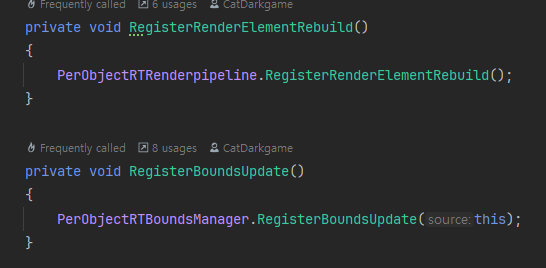
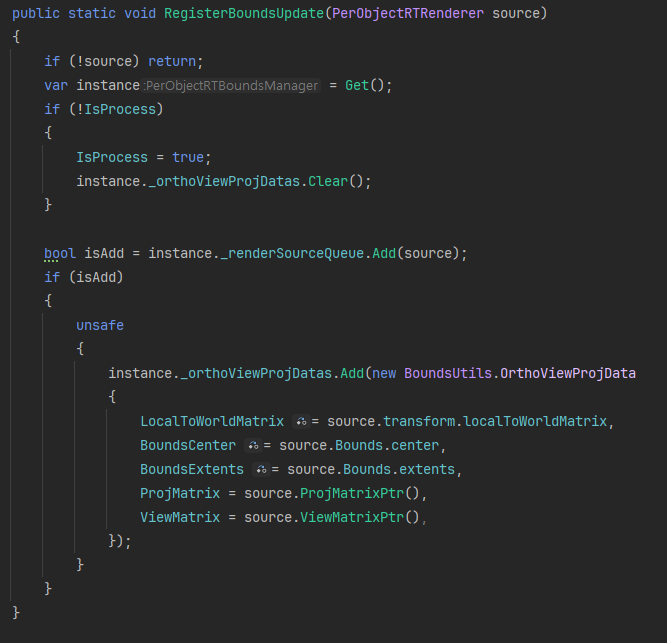
단일 List로 관리하는 이유는, 다수의 PerObjectRT Renderer 객체들의 OrthoViewProjection 행렬 값을 한번에 병렬 계산하기 위함입니다. 병렬 계산은 Job & BurstCompile을 활용했으며 이를 위해 모든 데이터는 Value 타입을 사용하여 Native 자료형을 사용할 수 있도록 합니다.
일반적으로 Job을 활용할때 Native 임시 객체를 생성하여 값을 복사하는 과정을 거치는데, 저는 unsafe 방식으로 구현해서, 직접 메모리 포인터(주소)값을 참조하도록 하여, 객체 복사 없이 Job을 호출하도록 했습니다.
[BurstCompile]
        private unsafe struct CalculateViewProjJobParallel : IJobParallelFor
        {
            [NativeDisableUnsafePtrRestriction][ReadOnly] public float3* LocalCorners;
            [NativeDisableUnsafePtrRestriction][ReadOnly] public float3* ViewCorners;
            [ReadOnly] public float3 Padding;
            [ReadOnly] public float Distance;
            [ReadOnly] public float NearClipOverride;

            [NativeDisableParallelForRestriction]
            public NativeList<OrthoViewProjData> OrthoViewProjDatas;

            public unsafe void Execute(int index)
            {
                OrthoViewProjData data = OrthoViewProjDatas[index];
                CalculateOrthoViewProjection(ref data);
            }

            private unsafe void CalculateOrthoViewProjection(ref OrthoViewProjData data)
            {
                float3 extentsWithPadding = new float3(data.BoundsExtents + Padding);
                float3 min = new float3(data.BoundsCenter - extentsWithPadding);
                float3 max = new float3(data.BoundsCenter + extentsWithPadding);

                LocalCorners[0] = min.xyz;
                LocalCorners[1] = new float3(min.x, min.y, max.z);
                LocalCorners[2] = new float3(min.x, max.y, min.z);
                LocalCorners[3] = new float3(min.x, max.y, max.z);
                LocalCorners[4] = new float3(max.x, min.y, min.z);
                LocalCorners[5] = new float3(max.x, min.y, max.z);
                LocalCorners[6] = new float3(max.x, max.y, min.z);
                LocalCorners[7] = max.xyz;

                float3 localFrontCenter = new float3(data.BoundsCenter.x, data.BoundsCenter.y, max.z);
                float4 localFrontCenter4 = new float4(localFrontCenter, 1.0f);
                float4 worldFrontCenter4 = math.mul(data.LocalToWorldMatrix, localFrontCenter4);
                float3 worldFrontCenter = worldFrontCenter4.xyz / worldFrontCenter4.w;

                float3 objForward = math.normalize(math.mul(data.LocalToWorldMatrix, new float4(0, 0, 1, 0)).xyz);
                float3 objUp = math.normalize(math.mul(data.LocalToWorldMatrix, new float4(0, 1, 0, 0)).xyz);
                float3 eye = worldFrontCenter - objForward * Distance;
                float4x4 viewMatrix = float4x4.LookAt(eye, worldFrontCenter, objUp);

                for (int i = 0; i < 8; i++)
                {
                    float4 localCorner4 = new float4(LocalCorners[i], 1.0f);
                    float4 worldCorner4 = math.mul(data.LocalToWorldMatrix, localCorner4);
                    float3 worldCorner = worldCorner4.xyz / worldCorner4.w;
                    float4 viewCorner4 = math.mul(viewMatrix, new float4(worldCorner, 1.0f));
                    ViewCorners[i] = viewCorner4.xyz / viewCorner4.w;
                }

                float left = float.MaxValue;
                float right = float.MinValue;
                float bottom = float.MaxValue;
                float top = float.MinValue;
                float viewMaxZ = float.NegativeInfinity;
                float viewMinZ = float.PositiveInfinity;
                for (int i = 0; i < 8; i++)
                {
                    left = math.min(left, ViewCorners[i].x);
                    right = math.max(right, ViewCorners[i].x);
                    bottom = math.min(bottom, ViewCorners[i].y);
                    top = math.max(top, ViewCorners[i].y);
                    viewMaxZ = math.max(viewMaxZ, ViewCorners[i].z);
                    viewMinZ = math.min(viewMinZ, ViewCorners[i].z);
                }

                float nearPlane = (viewMaxZ < 0.0f) ? -viewMaxZ : NearClipOverride;
                float farPlane = (viewMinZ < 0.0f) ? -viewMinZ : NearClipOverride + 1.0f;
                /*float4x4 projMatrix = new float4x4(
                    new float4(2f / (right - left), 0f, 0f, 0f),
                    new float4(0f, 2f / (top - bottom), 0f, 0f),
                    new float4(0f, 0f, -2f / (farPlane - nearPlane), 0f),//
                    new float4(-(right + left) / (right - left), -(top + bottom) / (top - bottom),
                              -(farPlane + nearPlane) / (farPlane - nearPlane), 1f));*/
                float4x4 projMatrix = new float4x4(
                    new float4(2f / (right - left), 0f, 0f, 0f),
                    new float4(0f, 2f / (top - bottom), 0f, 0f),
                    new float4(0f, 0f, 2f / (farPlane - nearPlane), 0f),
                    new float4(-(right + left) / (right - left), -(top + bottom) / (top - bottom),
                        (farPlane + nearPlane) / (farPlane - nearPlane), 1f));

                *data.ViewMatrix = viewMatrix;
                *data.ProjMatrix = projMatrix;
            }
        }
위와 같은 구현을 통해 PerObjectRT Renderer 객체는 실시간으로 Renderer의 Bounds 가 변경되어도 Local Bounds 및 ViewProjection 행렬 재구성이 빠른 속도로 가능하며, 대량의 오브젝트 대응도 가능하게 됩니다.


또한 Spine & SkinnedMeshRenderer의 애니메이션에 맞게 동적 Bounds 조절 가능합니다.
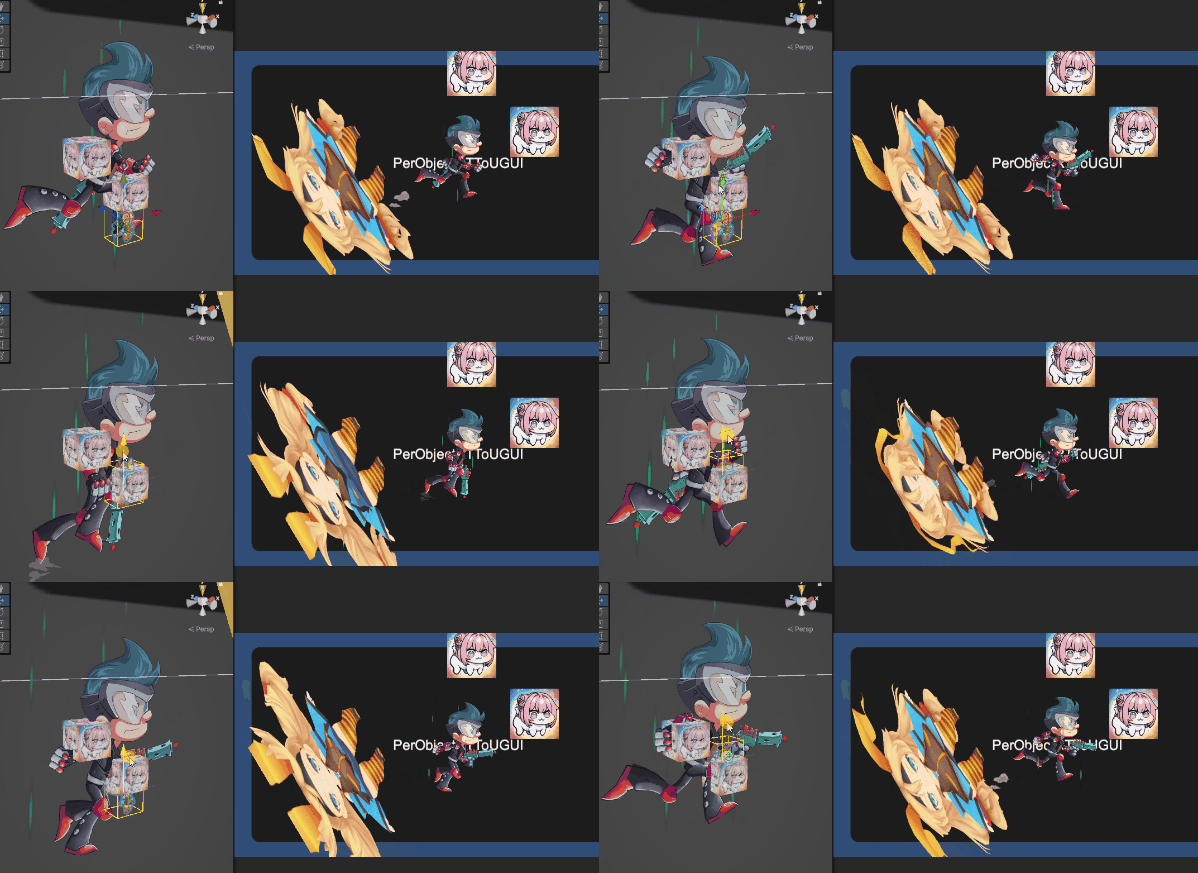
RenderTexture Atlas 구성
PerObjectRT 시스템에서 렌더링하는 RenderTexture는 PerObjectRT Renderer 갯수에 따라 동적으로 Atlas 사이즈를 조절합니다. Atlas는 단순하게 Slice(객체 1개) 크기와 최대 RT 사이즈를 지정해서 사이즈 변경이 필요하면 RT 객체 재생성하는 방식으로 제작했습니다.
추후에 Rectangle Packing과 같은 알고리즘을 활용해서 고정된 사각형 Slice가 아닌 적절하게 Atlas 빈공간에 쑤셔 들어가는 방식으로 개선 필요합니다.
internal static void CalculateSliceData(int sliceCount, out int slicesPerRow, out Vector2 scaledSliceSize, out Vector2Int atlasResolution)
        {
            if (sliceCount < 1)
            {
                slicesPerRow = 0;
                scaledSliceSize = Vector2.zero;
                atlasResolution = Vector2Int.one;
                return;
            }

            Profiler.BeginSample(ProfilerStrings.CalculateSliceData);

            Vector2Int sliceResolution = SliceResolution;
            Vector2Int maxAtlasResolution = AtlasResolution;

            int maxSlicesPerRow = maxAtlasResolution.x / sliceResolution.x;
            int maxRows = maxAtlasResolution.y / sliceResolution.y;
            int maxAllowedSlices = maxSlicesPerRow * maxRows;

            // Slice 개수가 최대치를 초과하는 경우 Slice 크기를 축소
            scaledSliceSize = sliceResolution;
            if (sliceCount > maxAllowedSlices)
            {
                float uvScale = Mathf.Sqrt((float)maxAllowedSlices / sliceCount);
                scaledSliceSize.x = sliceResolution.x * uvScale;
                scaledSliceSize.y = sliceResolution.y * uvScale;
            }
            slicesPerRow = Mathf.FloorToInt(maxAtlasResolution.x / scaledSliceSize.x);
            int rowsNeeded = Mathf.CeilToInt((float)sliceCount / slicesPerRow);

            // Atlas 크기 계산 (Slice 축소가 없다면 최적의 크기, 축소가 있다면 최대 크기 유지)
            atlasResolution = sliceCount > maxAllowedSlices
                ? maxAtlasResolution
                : new Vector2Int(
                    Mathf.CeilToInt(Mathf.Min(sliceCount, slicesPerRow) * scaledSliceSize.x),
                    Mathf.CeilToInt(rowsNeeded * scaledSliceSize.y)
                );

            Profiler.EndSample();
        }
- PerObjectRT Renderer 2개 & 3개일때 자동으로 Atlas 사이즈 조절.
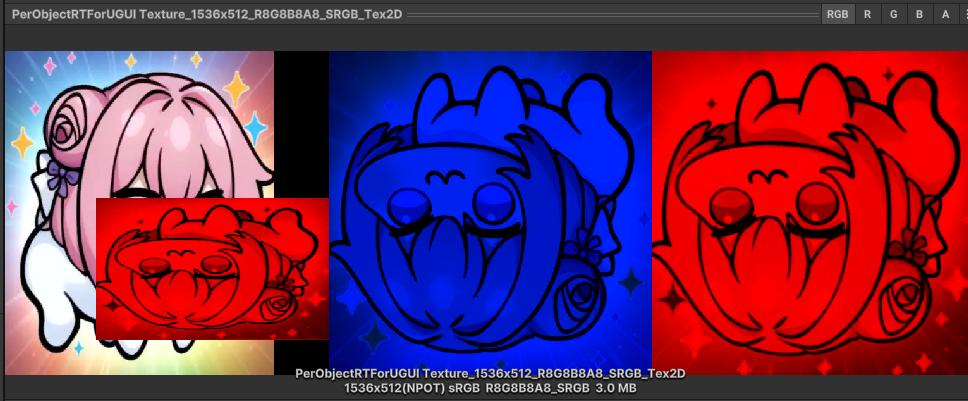
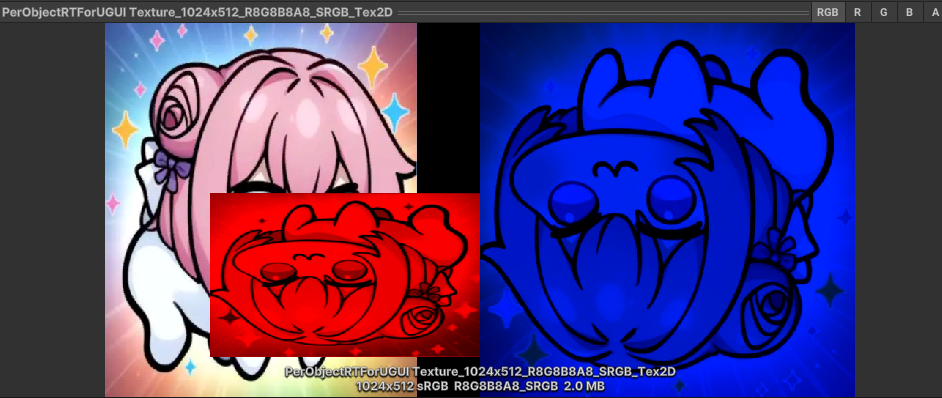
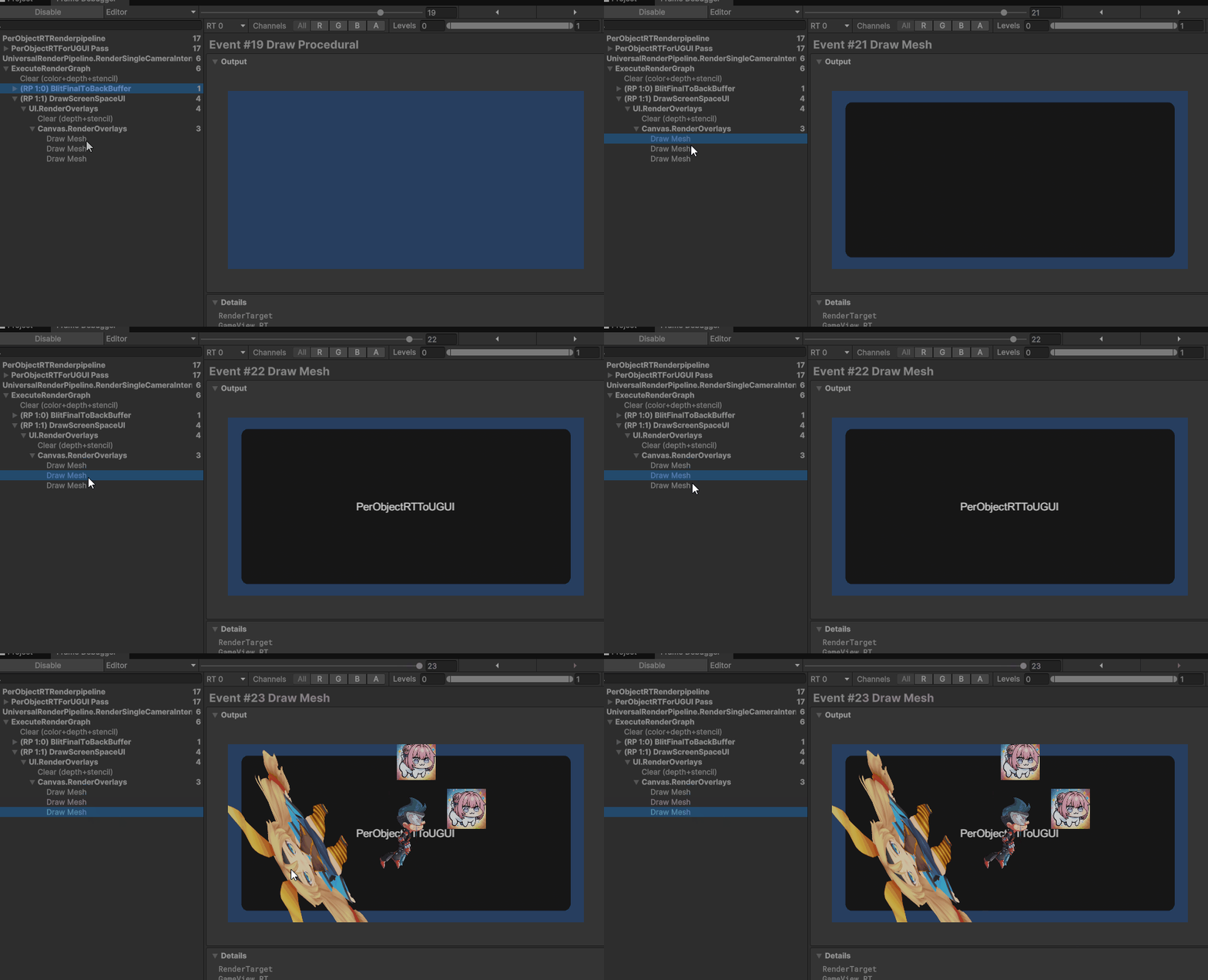
UGUI에서는 단일 Atlas Texture를 사용하기 때문에 배칭 조건만 된다면 1 드로우콜로 일괄 렌더링 가능합니다.
Tool 사용성 & API
툴 사용성은 매우 단순하게 디자인했습니다.
UGUI에 PerObjectRT Image 컴포넌트 추가해서 PerObjectRT Renderer 컴포넌트를 참조하면 해당 UI Image에 참조한 객체가 렌더링됩니다. 둘 중 하나가 비활성화하면 렌더링되지 않습니다.
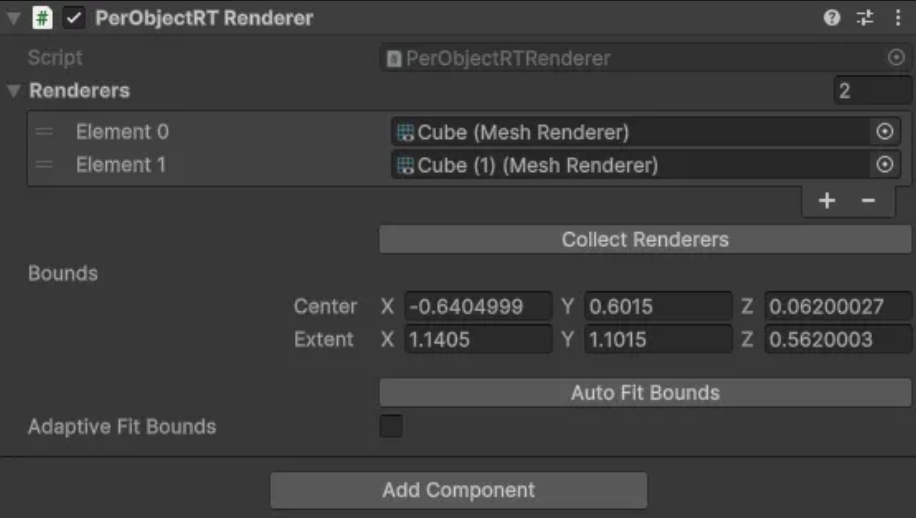

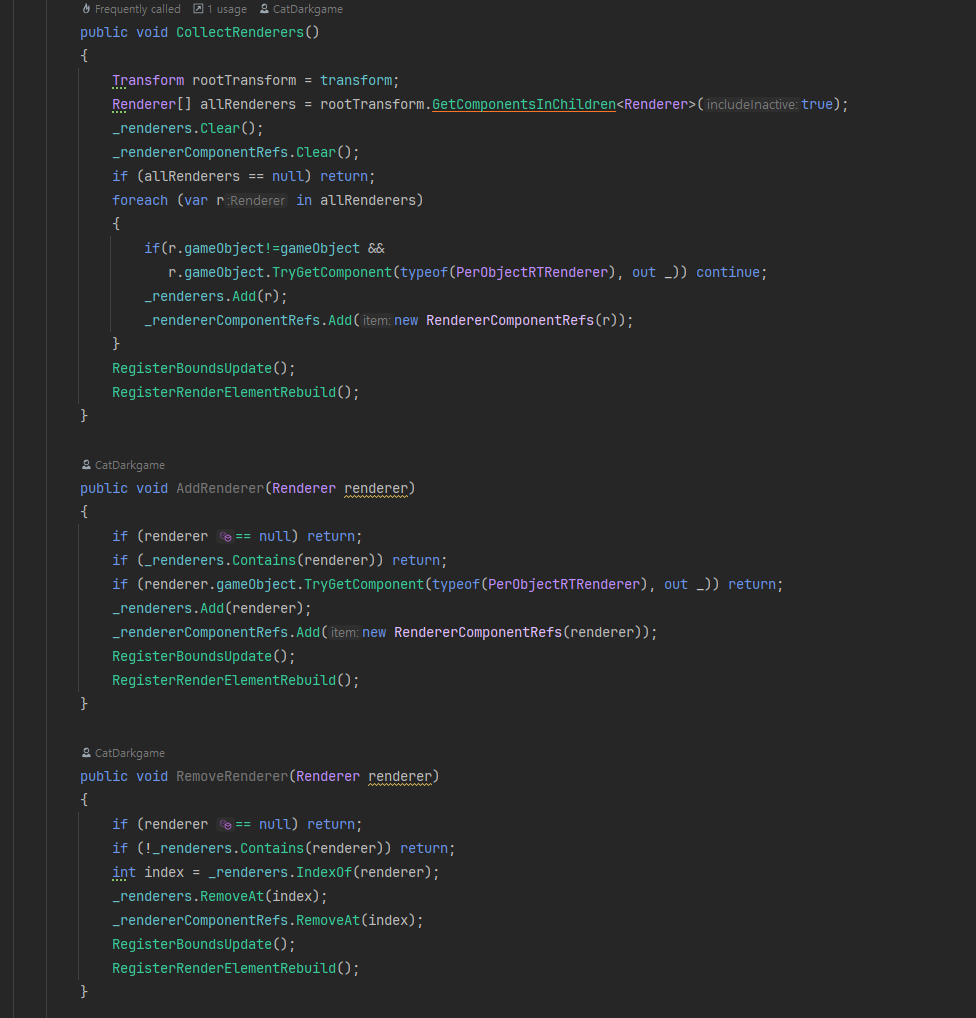
다른 스크립트에서 런타임 도중 객체 추가 & 삭제 관리 가능하도록 주요 함수는 public으로 선언되어 있습니다.
한계점
PerObjectRT 시스템은 목적에 맞게 개발되어, 실제 프로젝트에 사용되고 있습니다. (프로젝트는 추후 공개)
하지만 몇가지 큰 한계점이 존재합니다.
- SRP Batcher 미지원.
- 실시간 라이팅 및 UnityPerDraw 상수 버퍼 관련 기능 미지원.
- Animator 및 ParticleSystem Camera Culling 미지원.
위 한계점은 전부 Unity & URP 내장 시스템에서 동작하는 기능으로, 커맨드버퍼로 직접 렌더링하는 시스템 특성상 해당 기능을 직접 구현하지 않으면 극복 불가능합니다.
위 기능들을 하나같이 다 규모가 큰 작업으로, 차라리 성능 낭비를 좀 하더라도 URP 렌더파이프라인 기반으로 다시 만드는게 더 나을 것 같습니다.
'Unity' 카테고리의 다른 글
| Unity URP에서 화면 효과를 최적화하는 새로운 접근법 (3) | 2025.07.22 |
|---|---|
| Unity6 RenderGraph 호환 RenderPass 간단 예제 & 주요 포인트 설명 (1) | 2025.07.16 |
| Unity6 Dynamic Resolution 소개 및 대응 방법 (1) | 2025.07.10 |
| Unity RenderBufferLoadAction & StoreAction 옵션 설명 (0) | 2025.06.11 |
| Unity Cubemap Shadow (0) | 2025.04.28 |
WRITTEN BY
- CatDarkGame
Technical Artist dhwlgn12@gmail.com


